Thursday, June 27, 2013

Vista - User Profile failed to login

Click Start, ->regedit 

Now in in regidit, HKEY_LOCAL_MACHINE\SOFTWARE\Microsoft\Windows NT\CurrentVersion\ProfileList

In the navigation pane, find folder that begins with S-1-5 (SID key) followed by a long number.

Click each S-1-5 folder, locate the ProfileImagePath entry in the details pane, and then double-click to make sure that this is the user account profile that has the error.

If you have two folders (ie one is duplicate) starting with S-1-5 followed by some long numbers and one of them ended with .bak, you have to rename the .bak folder.

Ie-  Right-click the folder without .bak, and then click Rename. Type .ba, and then press ENTER.

again right-click the folder that is named .bak, and then click Rename. Remove .bak at the end of the folder name, and then press ENTER.

now again right-click the folder that is named .ba, and then click Rename. Change the .ba to .bak at the end of the folder name, and then press ENTER.

Now Double-click the folder without .bak in the details pane, double-click RefCount, type 0, and then click OK.

Then Click the folder without .bak, in the details pane, double-click State, type 0, and then click OK.

Close Registry Editor and Restart

Wednesday, April 17, 2013

Make Symbols with Keyboard

Alt + 0153..... ™... trademark symbol
Alt + 0169.... ©.... copyright symbol
Alt + 0174..... ®....registered ­ trademark symbol
Alt + 0176 ...°......degre ­e symbol
Alt + 0177 ...±....plus-or ­-minus sign
Alt + 0182 ...¶.....paragr ­aph mark
Alt + 0190 ...¾....fractio ­n, three-fourths
Alt + 0215 ....×.....multi ­plication sign
Alt + 0162...¢....the ­ cent sign
Alt + 0161.....¡..... ­.upside down exclamation point
Alt + 0191.....¿..... ­upside down question mark
Alt + 1.......☺....sm ­iley face
Alt + 2 ......☻.....bla ­ck smiley face
Alt + 15.....☼.....su ­n
Alt + 12......♀.....f ­emale sign
Alt + 11.....♂......m ­ale sign
Alt + 6.......♠.....s ­pade
Alt + 5.......♣...... ­Club
Alt + 3.......♥...... ­Heart
Alt + 4.......♦...... ­Diamond
Alt + 13......♪.....e ­ighth note
Alt + 14......♫...... ­beamed eighth note
Alt + 8721.... ∑.... N-ary summation (auto sum)
Alt + 251.....√.....s ­quare root check mark
Alt + 8236.....∞..... ­infinity
Alt + 24.......↑..... ­up arrow
Alt + 25......↓...... ­down arrow
Alt + 26.....→.....ri ­ght arrow
Alt + 27......←.....l ­eft arrow
Alt + 18.....↕......u ­p/down arrow
Alt + 29......↔...lef ­t right arrow

Wednesday, April 10, 2013

Overriding rules in Java


  • Should be same method name and argument list in base class and derived class
  • Return type can be co-variant, meaning if super class return type is Map, subclass return type can be Hash Map.
  • Access specifier in the derived class should be broader/bigger than that in the base class;
    • ie; if base class method is protected, the derived class method can  be protected or public- but cannot be private or default
  • Exception in the subclass  should be same or subclass of base class
    • ie:-if base class exception is IOException, subclass can be FilenotFoundException-but cannot be Exception.

Saturday, March 9, 2013

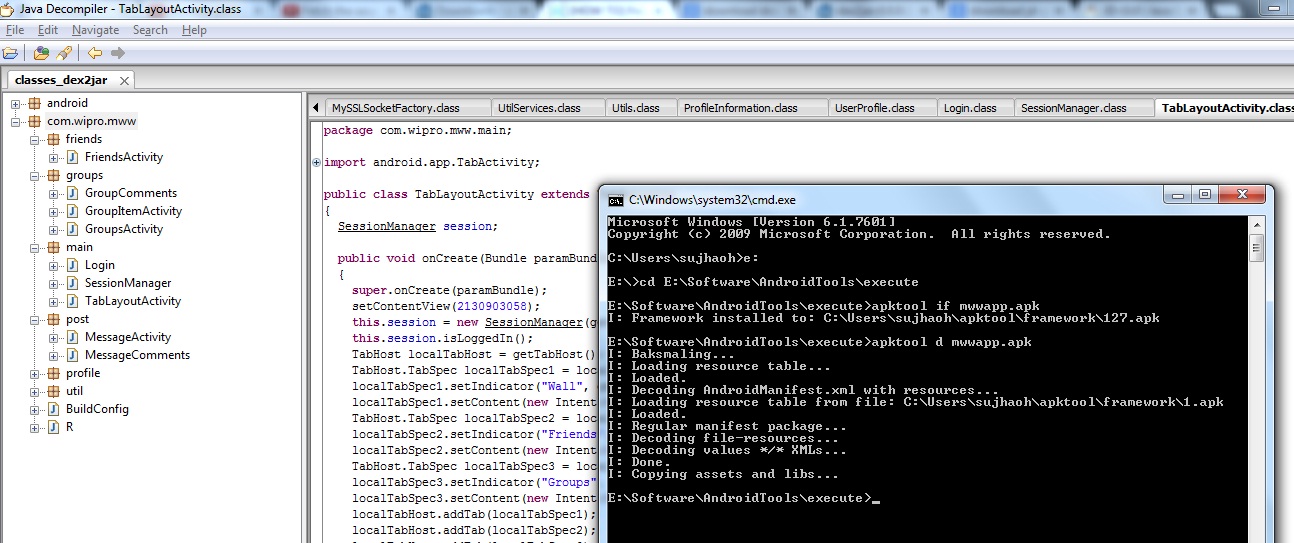
Get the source code from an APK


First Download

  • dex2jar -> https://code.google.com/p/dex2jar/
  • Java Decompiler –> http://java.decompiler.free.fr/?q=jdgui
  • android-apktool and apktool- -> https://code.google.com/p/android-apktool/
For Source code

Rename the apk file to zip file. Extract the files in the same folder
Extract dex2jar into the same folder, or copy classes.dex from the extracted apk to the dex2jar extracted folder.

Give the command 
#dex2jar classes.dex
You can now see class_dex2jar in your folder( a executable jar file )

Now you run jd-gui.exe downloaded with the java decompiler.
Open the class_dex2jar folder  in decompiler(jd-gui), now you can see all source codes
File-> Save all sources
Now you have the java source in zip file named classes_dex2jar.src.

For XML

Create a new folder for xml, and put the apk file in that folder.

Now extract the downloaded apktool and apktool-install-window.

Put your xxx.apk in it then run the command 

     apktool if xxx.apk

after that run the command 

     apktool d xxx.apk

A new folder with the xml files will be created.

So All the source code is ready -- enjoy :)

Please Note: Do not misuse this tutorial, just sharing my knowledge for learning purpous


Tuesday, February 19, 2013

Aggregation


Aggregation means HAS –A relationship

Eg: Employee has Address
ie-
class Employee{
int id;
String name,salary;
Address address;//Address is a class
}
employee -> name, id, salary also has Address -> which itself has different attribute like pincode, city, country etc.
When there is no IS-A relationship(ie: inheritance), best way of code reuse is aggregation.
Inheritance should be used only if the –IS-A relationship is maintained in the life time of the object, otherwise aggregation is the best choice.

Android Version and Name

Version
Name
1.5
Cupcake
1.6
Donut
2.1
Éclair
2.2
Froyo
2.3
Gingerbread
3.1,3.2
Honeycomb
4.0
Ice cream sandwitch
4.1
Jelly Bean

Thursday, February 7, 2013

ERROR 2006 (HY000): MySQL server has gone away

Issue:


mysql -u root -proot123 mydb < /root/db-2013-01-30.sql
ERROR 2006 (HY000): MySQL server has gone away
No connection. Trying to reconnect...

Analysis:-

Actually dump file having large INSERT queries, and also “max_allowed_packet” size was set to very low value.

So, when the mysql client or the mysqld server receives a packet,which is bigger than max_allowed_packet bytes, it will throw error and close the connection.

Solution:-

In /etc/my.cnf , I updated the entry
max_allowed_packet=1M
to
max_allowed_packet=64M

now run the query for restore again:-
mysql -u root -proot123 mydb < /root/db-2013-01-30.sql

It worked!!